Showing posts with label accessibility. Show all posts

Sunday, November 16, 2008

Low Vision Gadgets: Amazon Listmania

I am creating an Amazon Listmania list, Lov Vision Gadgets, for all those nifty little things that I fund unexpectedly helpful as a visually-impaired person. This is not a list for those expensive low vision aids. Instead, I want to highlight items not marketed for the visually impaired, but are still quite useful. The first item on the list is the LED headlamp about which I recently posted.

Suggestions are welcome!

Spelunking Your Books

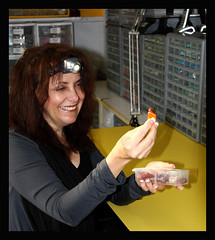
Inspired by a fellow visually-impaired photographer on Flickr (see the image of Sandra on the right), I went to my local outdoors store and bought an LED headlamp, the Tikka Plus, from Petzl. The headlamp is great for reading! I have been using booklights to supplement ambient room lighting for a while now, but have never been satisfied. My eyesight forces me to hold the book quite close, so these booklights are often obstructed by my own forehead. While the headlamp is not perfect, it is a significant advance in convenience and quality.

Personally, I would prefer a more diffuse light and one with more low intensity options. The light is designed to throw a wide beam outdoors or in caves, so the light hitting a page a few inches a way works more like a spotlight. I will experiment with some ways to diffuse the light a bit, possible some opaque paper, bu tI already look geeky enough with it on.

Hopefully, someone will come out with a headlamp designed specifically for the visually impaired, or at least for home honnyists whose need for close up lighting is similar. I have contacted Petzl with the suggestion.

Addendum: I have found a web site that has a headlamp specifically for the visually impaired। I can not say anything more about the lamp or the site as I have had no experience with either. Leave a comment if have any thoughts.

Stanza - Accessible E-Book Reader for the iPhone

Scanning through the Personal Tech section of the Times, I bumped into an interesting tidbit, "Tip of the Week - Turn Your iPhone Into an e-Book - NYTimes.com". I have an iPod Touch (the iPhone sans phone), so I ws intrigued, though remaining skeptical, by this tip. I just downloaded the app, Stanza, to my iPod and fell in love. On a technical level, it is a perfect application of accessibility for a visually impaired user. The font sizes can be adjusted with a very wide range. You can select font and background colors with a wide selection of choices, not just a simple reverse color scheme option. The screen rotates with the iPod, so you can read it landscape with the larger text. Pages can be turned with a simple flick on the screen. Best of all, it retains your choice of settings. I could not be happier with the accessibility.

Now I have to download the desktop version and hope that there are interesting e-books to read . . .

Monday, August 04, 2008

Curiosity & The Blind Photographe

I just stumbled across this essay, a blind flaneur » Curiosity & The Blind Photographer, on "accessibility in terms of culture and cultural production." A worthwhile read with some magnificent photos. What do you think? What is the link between accessibility and curiosity? Is access no longer a one-way street?

Amartya Sen paved new roads in economic thought when he changed the idea of poverty being absolute to being relative. To translate, Sen simply pointed out that what would have being accounted wealthy a thousand years ago would be accounted poverty today. Sen pushed a participatory (i.e. relative) concept of poverty. Someone is poor if they cannot fully participate in the economy (too poor for a phone, transport or sufficient nutrition for health, e.g.).

I can see clearly a parallel here to accessibility being defined as the ability to participate in society (or culture). Food for thought...

Saturday, July 19, 2008

Slashdot | GM Researching Windshields For Old Drivers

Slashdot is running an interesting piece on a new accessible technology in development; GM Researching Windshields For Old Drivers. It seems like a cool idea that would benefit all drivers, not just older ones.

I really appreciate seeing developments in technology oriented towards accessibility like this one. Maybe one day, this will allow partially sighted folks to drive as well.

Image Zoom : Firefox Add-on

To continue the theme of useful Firefox extensions, I also find myself using Image Zoom all the time. This extension adds another option to the context menu (the one that pops up when you use the right click button). With it installed, you have the option to increase the size of the image (i.e. zoom in) right there in the web page. You don't have to copy and paste it into another program or open it in its own page, you can just zoom in right there. Very useful!

In particular, I find it useful when shopping (either in Amazon or eBay) and the accompanying image is just too small to make out. Now I right-click on the image and zoom in. I have also found it useful on those DIY project pages when the illustrations are just too tiny to help.

Some images do not have good resolution, so, when you zoom in, the image 'pixelates' and becomes blurry. But that is not Image Zoom's fault. Give it a try. You will like it.

Thursday, July 17, 2008

Accessible Windows Vista Themes

As I noted in the last post, I have just moved to a Windows Vista machine. I have spent the last few days looking for a decent theme with large fonts and good light-on-dark contrast. There are none!

The Windows high contrast themes, besides being hideous, do not have large text. To check these out, you can either right-click on the desktop and select 'Personalize' and then to 'Windows Colors and Appearance' or go to the 'Ease of Access Center' Control Panel and then to 'Set Up High Contrast'. Either way, you are stuck with an ugly interface with the small font. The 'Ease of Access Center' has an option for changing something called DPI to make the font easier to read, but that only goes so far.

I checked out the trial version of WindowBlinds, but I could not easily find any accessible themes. After a frustrating few minutes with the software, I sent an email to the company who sells it, asking them if WindowBlinds offeres any accessible themes.

In the end, I spent a good chunk of time adjusting all the color and font settings in the 'Windows Colors and Appearance' panel. After a few mistakes and having to start from scratch a few times, I succeeded in creating and saving a minimally acceptable theme. It is not professional in the least. My next job is to figure out how to export and share it with you. For now, email me if you would like a copy.

Do you know of any useful themes? Do you know someone who can create one? Let me know!

Access Firefox: Because the Internet is for everyone.

Having just moved to a new computer, I have been installing software and making the system more accessible. In trying to find all the little ways to make Firefox more accessible, I ran across this website, AccessFirefox.org. They do a remarkable job of collecting all the Firefox themes ans extensions that help make Firefox a superior browser for ease of use. My favorite so far is Accessibar, which adds a toolbar to the top of the screen that allows you to control the text size and the colors of each website. The large icon themes are also quite useful.

The one item that is missing right now is No Squint. With the latest version of Firefox, No Squint allows you to control the full zoom and text zoom of each website. What is particularly useful is that it remember the particular setting for each site. I find that different websites require different adjustments, depending on the amount of text vs. images and how many columns the site has. Accisbar allows you to adjust font sizes, but is not site specific and has no 'memory'. I will recommend that AccessFirefox add No Squint to their list.

Do you know of any Firefox extensions or Greasemonkey scripts that make Firefox and the web more accessible? Please let me know!

Thursday, April 24, 2008

Study explores how blind pedestrians can cross safely

I spotted this article, Study explores how blind pedestrians can cross safely, in the Triangle's News & Observer. "Walk faster" does not seem like the best technology for pedestrians, never mind visually impaired ones.

Sunday, April 13, 2008

My Point Exactly

This is what I have being saying for a while now:

“A lot of technology was originally developed for people with severe disabilities,” Mr. Sinclair said. “But these solutions are proving valuable to a much broader range of people.”

Th Times is running a piece, At a Certain Age, Simplicity Sells in High-Tech Gadgets , in today's paper. It is worth the read, though it is light on examples. The article mentions the new Jitterbug, some new GPS units and some desktop concessions.

When are these companies going to realize that a few easy design tweaks can make their products more appealing (and accessible) to a wider audience? More high-contrast visual interfaces, more auditory and tactile cues, more text-to-speech. None of this would be expensive, bue all of it would make products better.

Thursday, December 20, 2007

Finally, Pogue Speaks to US

David Pogue over at the NY Times has addressed our main issue in his blog: Gadgets With the Blind in Mind - Pogue’s Posts. A look through the comments so far (over fifty as of now) shows quite a range of responses from ignorant trolls to many insightful contributions. It is worth reading the comments (if you can drain the red from you eyes from the reaction to the troll comments).

Thursday, November 08, 2007

Transit Info by Text Messages

Have you ever needed to take a bus or train but not had a schedule handy? Have you ever looked at the posted schedules at stops and found them missing or out of date? Or, like me, do your find printed schedules too difficult to read? I have a plan. However, I am not the first to think it up, as it has been implemented in some cities.

Public transit systems ought to offer schedules via text messages. You can access all sorts of data, from nearby restaurants to movie schedules to sports scores via Google's SMS system (see description at sms.google.com). Why couldn't the same system apply to transit schedules?

If each stop were label led with a stop ID, then a person waiting at the stop could send the stop ID to the designated text message service (e.g. GoTTA for the Triangle Transit Authority) and receive in return the next five buses expected at the stop. Sending the bus line (e.g. CHT NS for Chapel Hill Transit's NC route or TTA 412 for the TTA's 412 route) would return the remaining schedule for that bus for the day. I think that this system would be very useful. This could also be hooked up with those new real-time bus/train notification systems.

With such a system, transit authorities would not have to roll out real-time schedule signs at every stop to provide riders with access. Bus systems would not need to print and distribute so many bus schedules. Riders could access this information anytime and from anywhere.

This system makes buses and trains more convenient for everyone, but it also makes them more accessible to the disabled. Disabled people must rely disproportionately on public transit and have greater challenges reading and using available schedules. So I hope more cities adopt such systems for their accessibility as well as their convenience.

Saturday, September 15, 2007

Zooming in the new IE

At first, I did not like the new Internet Explorer (IE). It buried the accessibility options I like most (text size and ignore colors specified on webpages). There is one new redeeming feature, the new zoom.

Zoom does what it says. Just like zooming in and out with your camera, zoom lets you magnify websites at any level of magnification you desire. I usually keep it between 125% and 200%, but it depends on the website. Very useful. Unlike text size, zoom works on all web pages. The only downside is that many pages will extend eve further off the right side of the screen. The solution for that has been to get a wide-screen monitor.

Zoom's official home is under the Pages menu right about my other favorite, text size.The excellent news is that there are two easier ways to access it. First, the bottom right corner of the IE window has a "change zoom level" drop down menu. Even better are the keyboard controls; Ctrl-+ to zoom in and Ctrl-- to zoom out.

Time to zoom away.

Wednesday, September 12, 2007

The Graying of the Web (NYTimes)

The Times has a great article on the elder segment of web users. They may be evolving into to major new web force with very different web usage and consuming patterns. In addition to virtual changes, I think the baby boomer generation will push designers to develop more accessible (but still stylish) tangible products.

Tuesday, December 26, 2006

New Audio Tours: iJourneys

Today's NY Times has an artucke about a new audio tour company, iJourneys. It looks like a good one.

Saturday, December 23, 2006

Inaccessible Web Design

This is what a bad website looks like after I have set the font sizes so that I can read them. This is from Audible.com.

Monday, October 09, 2006

Portable Player Portal Main Page

Here is a nice review of iPods, other digital music players and related software from an accessible perspective: Portable Player Portal Main Page. I am interested in Rockbox, which has a voice-based interface, but it does not allow for Audible.com playback.

Thursday, August 17, 2006

Pogue’s Posts - As We Get Older, Type Gets Smaller - Technology - New York Times Blog

Pogue's post this past week, As We Get Older, Type Gets Smaller, addresses a major issue that I think about too much. I reset the screen resolution, override default fonts and sometimes use Zoomtext.

Thursday, July 20, 2006

Google Accessible Search

This, Google Accessible Search: "Accessible Web Search for the Visually Challenged". looks to be a great new resource for the visually impaired. Not only does it provides better place for the visually impaired to search, but should also put pressure on all web developers to create more accessible web sites.

Tuesday, March 21, 2006

Firefox Themes

Firefox has a number of large icon themes, available here. They are easy to install and to change if you do not find them useful.